Ad metrics in CrUX: what they measure and how to use them
Translated from the Spanish original. Leer en español

Chrome has added four public ad-load metrics to CrUX. They are not an SEO factor, but they are useful for auditing the real experience of a website.
In brief
- On September 15, Chrome added four experimental advertising metrics to CrUX: Ad Count, Ad Density, Ad Weight: Network and Ad Weight: CPU.
- Google hasn't said they are ranking factors, they are not part of Core Web Vitals and there are no official thresholds.
- What is valuable is that part of the ad pressure becomes public field data, also for domains you don't control.
- Use them as context in audits, comparing templates, monetization changes and competitors, and keeping in mind the methodology's limitations.
What has changed
There were already plenty of metrics for the performance perceived by real users: LCP, INP, CLS. And about ads we only had that unscientific impression when opening a page: "there is too much advertising here". Numbers were missing.
That changed on September 15: Chrome added four experimental metrics to the Chrome User Experience Report (CrUX) that measure how much advertising there is and how much it costs during a real session. The easy headline would be "new SEO factor?", and the answer is no, Google hasn't said any such thing. What matters is something else: part of a site's ad pressure becomes public field data, aggregated from real Chrome users and available even for other people's domains.
The four metrics at a glance
| Metric | What it measures |
|---|---|
| Ad Count | Average number of ads visible in the viewport during the session. |
| Ad Density | Average percentage of the viewport occupied by ads. |
| Ad Weight: Network | Kilobytes transferred by ad frames and resources. |
| Ad Weight: CPU | Cumulative CPU time consumed by ad frames and workers. |
If you cannot see all the columns, scroll the table sideways.
A key nuance: Ad Count and Ad Density don't count the ad slots in the HTML. Chrome samples the viewport while browsing to reflect what the user really sees. So two pages with three identical slots can give opposite experiences: on one the ads are concentrated in one area; on the other there is advertising in view almost all the time. Counting slots doesn't separate those cases; measuring exposure throughout the session starts to.

Values are given at the 75th percentile and can exist per origin or per URL if the sample is enough. For now they are experimental, and Chrome warns that they may change based on feedback.
What Google is not saying
Before shouting "new SEO factor", a reminder, because we know ourselves:
- Google hasn't announced that they are ranking signals.
- They don't belong to Core Web Vitals.
- There are no official thresholds yet to label them "good", "needs improvement" or "poor".
- No documentation says that more Ad Density implies a worse position than another page with less density.
Being in CrUX doesn't mean Google Search uses it to rank results. That would be a very convenient deduction.
Performance and ad pressure are not the same thing
CrUX has been used mainly for three questions: how the page loads for real users, how it responds when interacting and whether the content shifts during loading. Core Web Vitals covers loading, interactivity and visual stability.
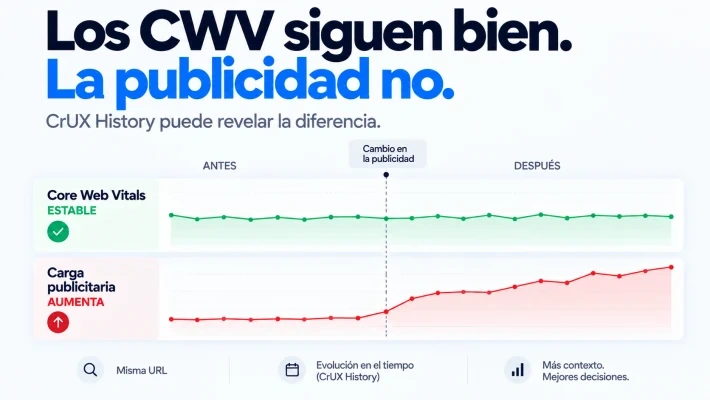
The new metrics add a different question: what does the ad layer cost the user? A page can have good LCP, INP and CLS and at the same time keep downloading many ad resources or spending CPU during the session. They don't contradict each other: they measure different layers, the space advertising takes up and its network and processing cost. For me, that is the most interesting nuance from an SEO angle.

What new analyses they allow
When studying a competitor we could already look at their public Core Web Vitals data if they had a sample, but there was no equivalent for their ad pressure. Now you can put together a joint analysis, CWV + Ad Density + Ad Count + Ad CPU + Ad Network, and compare it across templates, URLs and domains.
Before and after changing monetization
You can also follow what happens when a website changes its monetization, adds an ad provider, adds placements or modifies how ads load. For that the CrUX History API is very useful.
Example: a publisher renews its ad stack. After the change, Core Web Vitals stays at reasonable figures and it seems the experience hasn't suffered. But a second review remains: whether Ad Density went up, whether more ad resources are transferred or whether those ads consume more CPU. There can be an invisible regression if you only look at LCP, INP and CLS.
I find it far more useful than correlating Ad Density with positions three days after the metric appeared. That said, we are SEOs: surely someone is already preparing that Excel.
Competitive analysis
Since CrUX data is public for eligible sites, with enough sample you can compare the ad pressure of domains competing for the same thing. Not to rule that "12 of Ad Density is good" and "25 is bad" (Chrome hasn't set those benchmarks), but as a context reference.
It fits media, affiliate sites, marketplaces and websites where advertising weighs heavily in the business model, and also SERPs with very different models. In travel, one search brings together transactional pages, publishers, affiliates and guides; adding ad exposure, network and CPU helps understand the experience of each type of result. Not because Chrome points to the "best", but because you have more data. To compare who really competes in a SERP, look at Are you third on Google, really?.
Limits of the data
Public field data doesn't mean perfect data:
- They require eligible CrUX users and a sufficient volume of data.
- If a URL has no sample of its own, you have to go up to the origin level.
- The 75th percentile doesn't describe each individual session: it is aggregated information.
- Ad Weight: CPU only captures the CPU of ad frames and workers, according to the documentation; some ad scripts that run in the main frame may be left out.
That is why Ad Weight: CPU is not equal to the total cost of a page's ad technology. It is good for comparing, seeing trends and detecting changes, not for demanding a precision its methodology doesn't offer.
How to apply it in an SEO audit
- Start with sites that have a relevant ad presence. For now it isn't worth it for the rest.
- Cross the metrics with Core Web Vitals and analyze them by template type whenever the sample allows.
- Check CrUX History before and after big monetization or third-party provider changes.
- With competitors, treat them as context and not as an official benchmark, which Chrome hasn't published.
- Distinguish performance and ad pressure in the report: you can "pass" Core Web Vitals and still deliver a heavy experience because of the commercial layer.
If something changes in your traffic after touching ads or providers, you may also be interested in where to look if Google started to deindex your pages.
Frequently asked questions
Are the new CrUX ad metrics ranking factors?
Google hasn't announced it. They are not part of Core Web Vitals and there are no official thresholds or documentation relating a higher Ad Density to worse positions.
What is the difference between Ad Count and counting ad slots?
Ad Count and Ad Density are calculated by sampling the viewport during browsing, not by counting the spaces present in the HTML. Two pages with three slots can offer very different exposures.
Can I check this data for other domains?
Yes, CrUX data is public for eligible sites, when there is enough sample, and can be available at origin or URL level.
To finish your coffee
Chrome hasn't created four new SEO factors. It has done something that those of us who audit websites find more practical: put part of the ad load into public field data.
Before, we opined "too many ads" when opening the page and feeling like we were looking for the content with a metal detector. Now we can measure how many ads users actually get to see, how much space they take up and how much they cost in network and CPU in real sessions.
The valuable question is not whether Google will use Ad Density tomorrow to rank results, but "what can we find out today by crossing this data with Core Web Vitals, templates, monetization changes and competitors?" That can already be investigated.
If you want to add these metrics to a technical audit of your website, tell me your case.
Sources and further reading
- Chrome for Developers. "New ad metrics in Chrome User Experience Report" - September 15, 2026.
- Chrome for Developers. "CrUX ad metrics overview".
- Chrome for Developers. "CrUX ad metrics measurement methodology".
- Chrome for Developers. "CrUX ad metrics tooling guide".
- Search Engine Roundtable. "Daily Search Forum Recap" - September 16, 2026.
- PPC Land. "Chrome puts publishers' ad loads on public record with 4 new metrics".