Google ranks another URL: diagnose before touching anything
Translated from the Spanish original. Leer en español

If Google ranks another URL and not your landing page, it isn't always down to the canonical. How to separate duplication from relevance and diagnose it in 5 steps.
In brief
- Two problems that look alike from the outside need different diagnoses: Google can see two URLs as duplicates or very similar, or have both indexed and consider that one answers the intent better.
- The canonical is a signal, not an order: if the declared one and the one selected by Google don't match, review what contradictory signals your website sends (sitemap, internal linking, redirects, parameters).
- A specific landing page has to justify its existence with information the general page doesn't offer; repeating the location more times isn't enough.
- Diagnosis first, changes afterwards: no compulsive noindex, robots.txt or canonicals without understanding the reason.
When the URL that shows up isn't the one you prepared
You have created a landing page for a specific search. You have worked on it, it is indexed, it has useful content and it fits the site's architecture. On paper, it should be the one Google shows. You search the keyword and another one comes up: a category, a more generic page, an old article or that URL nobody remembered was still alive until it decided to start ranking.
The usual reaction is to touch things: canonical, internal linking, titles, sitemap, redirects. Before that, it is worth asking a more useful question: why does Google choose that page and not the one we expected?
Duplication or relevance: two different problems
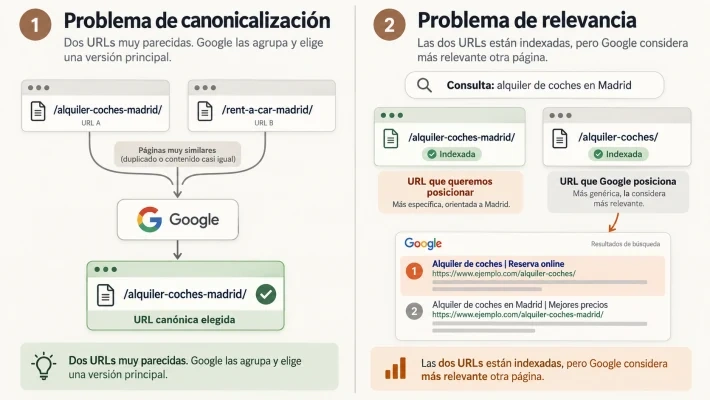
The two scenarios are easy to confuse, but they are diagnosed in completely different ways. With a car rental example:
| Case | What happens | Where to start |
|---|---|---|
| /alquiler-coches-madrid/ and /rent-a-car-madrid/ | Practically equivalent pages, with the same intent and very similar content. Google can group them and choose one as the representative version. | Investigate canonicalization and the signals we send. |
| /alquiler-coches-madrid/ and /alquiler-coches/ | Different content and both correctly indexed, but when searching "car rental in Madrid" Google shows the general one. There may be no canonicalization problem: it may consider that the generic one answers better. | Compare usefulness, context, architecture and linking of both. |
If you cannot see all the columns, scroll the table sideways.
The difference seems small, but it conditions everything. If you diagnose as a technical problem what is a relevance problem, you can spend quite a while modifying rel="canonical" tags that won't solve absolutely anything.
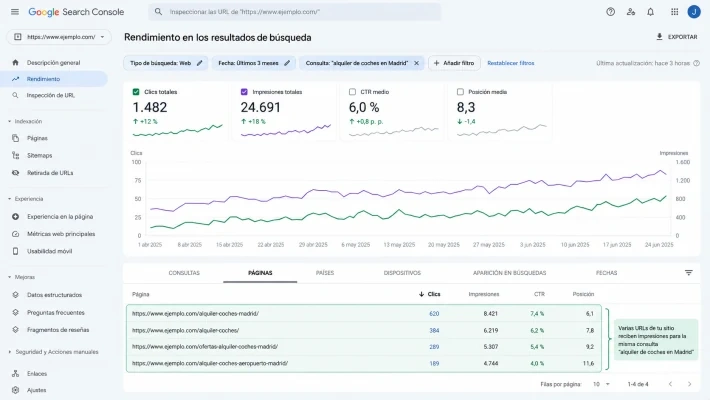
Step 1: see which URLs get impressions for that query
Go to Google Search Console, to Performance → Search results, filter by the query and open the Pages tab. What matters isn't only whether your landing page appears, but which other URLs get impressions for that same search. There may be only one, there may be two or three, or Google may alternate between several over time.
That data changes the approach: you stop thinking "my landing page doesn't rank" and move to something more concrete: Google relates this search to several pages on my site, what does it see in each to choose between them? That way you avoid solving a problem you haven't identified yet.
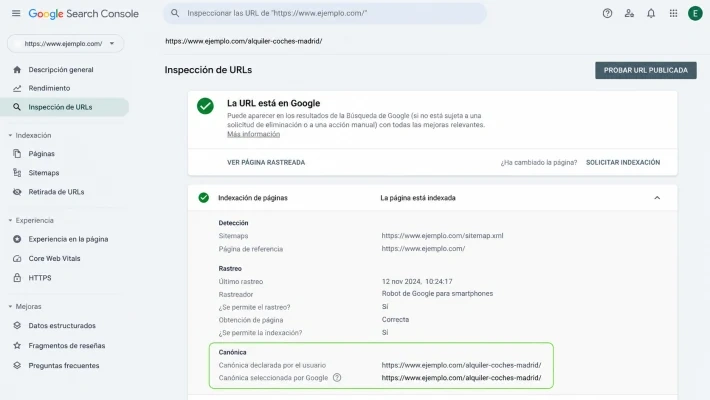
Step 2: compare declared and selected canonical
Inspect the URL you want to rank. Search Console lets you compare the user-declared canonical with the one selected by Google. If they match, perfect: at least for now, leave the canonical and move on to other factors. If they don't match, you have a relevant clue.
Remember that rel="canonical" isn't an absolute order, it is a signal. Google can receive it and, at the same time, find others indicating that another URL represents that content better. The problem arises when our website tells several stories at once: we declare one URL as the main one, but the sitemap includes another version; the navigation links mostly to a different page; old redirects, parameters, duplicate versions or pages that keep receiving internal links months after they stopped being important remain. Each detail on its own seems small; together they generate quite a lot of confusion.
Step 3: what story does your architecture tell
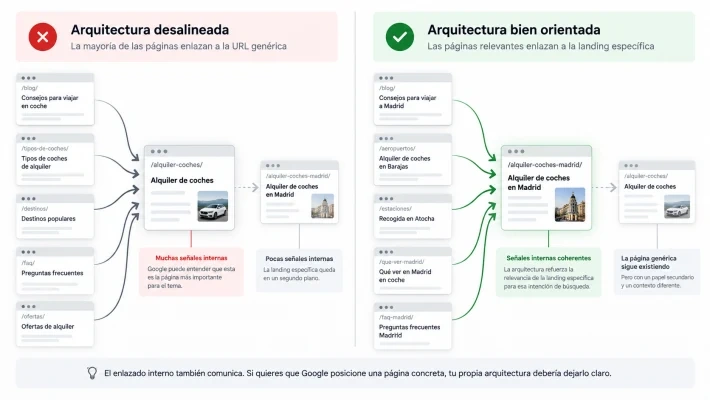
A frequent contradiction: in your keyword document you have decided that /alquiler-coches-madrid/ is the important URL, but the website behaves as if the main one were /alquiler-coches/. The general one receives dozens of internal links from categories, articles and landing pages, with anchors like "car rental", "book a car" or "cheap cars". The Madrid landing page, meanwhile, is buried several levels down and barely receives a few links. For you the target URL is crystal clear; for the architecture, maybe not so much.
Internal linking doesn't only serve to distribute authority: it also establishes relationships between content, hierarchies and context. Review which pages link to each URL, with what anchors, at what depth they are and what role each one plays. It isn't about manufacturing a hundred links with exact anchor, but about making sure architecture and SEO strategy don't look like projects made by two companies that don't talk to each other. We develop it in internal linking: knowing where you link isn't enough.
Step 4: open both pages and compare them without affection
Suppose technically everything adds up: the canonical matches, the URL is indexed, the sitemap gives no problems, there are no strange redirects or obvious contradictions in the linking. Then open both pages side by side. Forget for a while which one is "the SEO landing page" and simply assess which one resolves the search better:
- Which one explains what the user needs sooner?
- Which one has more context?
- Which one develops the topic better?
- Which one answers more related questions?
- Which one receives links from really relevant pages?
- Which one has been accumulating signals for longer?
Sometimes we design a page around a keyword and assume that makes it the best answer. It doesn't always happen. And Google has no access to our spreadsheet where it says TARGET URL in fluorescent yellow: an unforgivable lack of coordination, but we will have to move on.
Step 5: the specific landing page must justify its existence
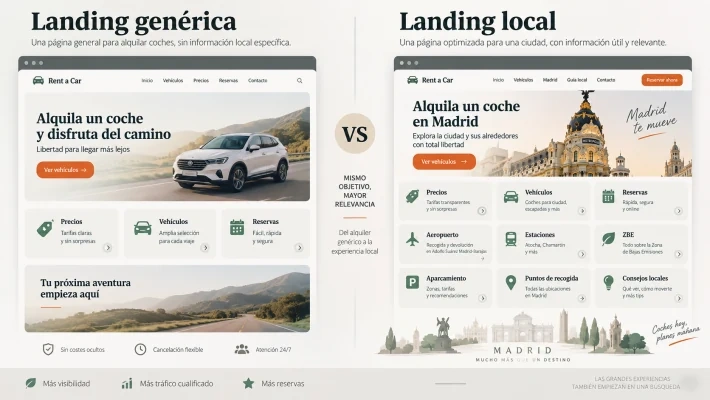
This weighs especially on large projects with many pages built on geographic or transactional variations. Imagine a general "car rental" page and another "car rental in Madrid". The second changes the title, adds Madrid a few times, mentions Barajas, puts Atocha in an H2 and little else; the rest is practically identical. For us they are two different landing pages; for Google they can be two documents that are too similar.
A specific page must provide something the general one can't. In the Madrid case: pickup points, the airport, stations, the low emission zone, parking, differences between areas, price behavior, local tips or questions specific to the destination. You don't need two thousand words because someone said long content ranks better; you need a real reason to exist. Specificity doesn't consist of repeating the location more, but of answering better the needs that arise precisely because of that location.
How to apply it: what to do depending on what you find
The solution depends entirely on the diagnosis:
- If the two pages are practically duplicates, consolidate signals and decide which one works as the main one.
- If both URLs must exist, work to differentiate their intent and content better.
- If an old page has been replaced by another truly equivalent one, consider a redirect.
- If Google prefers a general page over a specific landing page, first review that landing page's usefulness, context, architecture and internal linking.
What I wouldn't do is apply aggressive solutions without understanding the reason: I wouldn't noindex the page that is ranking to force Google to use another one, I wouldn't block URLs with robots.txt, I wouldn't change canonicals compulsively nor request indexing every time I modify two paragraphs.
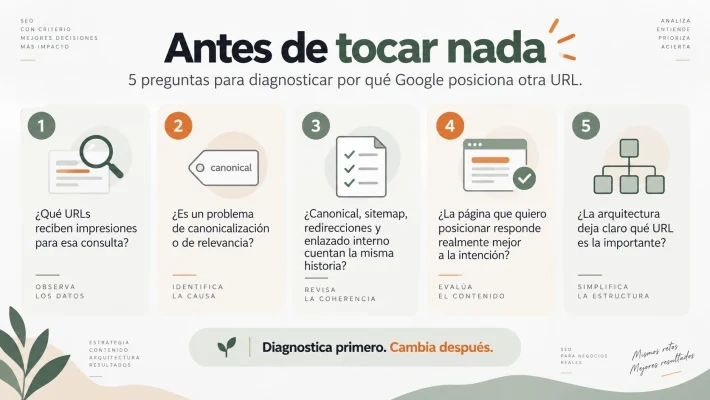
The five questions before touching anything
The order has little glamour, but it usually turns out quite a bit cheaper. When Google ranks a URL different from the expected one, I try to answer:
- Which pages get impressions for that query.
- Whether there is a real canonicalization problem or Google is choosing between different pages.
- Whether canonical, sitemap, redirects and internal linking tell the same story.
- Whether the page I want to rank answers the intent better.
- Whether the architecture makes clear which URL should play that role.
It may be that after reviewing everything you still think Google chooses the wrong URL. At least you will have something more useful than a suspicion: a diagnosis. Many times Google doesn't ignore your favorite page: it chooses between several based on the signals you yourself have given it. If you are interested in knowing when a result is where you think it is, go through Are you third on Google, really?.
Frequently asked questions
How do I know if it is a canonicalization or a relevance problem?
See whether the two pages are practically equivalent (possible grouping by Google) or have different content and both are indexed (Google may consider that one answers the intent better). Search Console helps you by comparing declared and selected canonical.
Where do I see which URLs rank for a query?
In Search Console, Performance → Search results: filter by the query and review the Pages tab to see which URLs get impressions, even if Google alternates between several.
Should I noindex the URL that shows up to force the other one?
No. Nor block URLs with robots.txt, change canonicals compulsively or request indexing after every small change. Diagnose first.
To finish your coffee
Before trying to convince Google to change its mind, check that your own website is clear about which page it wants to win. If you want us to review it on your project, tell me your case. And to document each query, the SERP Reality Check template (in Spanish) works as a starting point.