Google changes your page's title: causes and what to check
Translated from the Spanish original. Leer en español
Google changing your title doesn't prove it ignores your work: it can use the H1, og:title or anchors. Seven checks in order before touching the title.
In brief
- The <title> you write is a proposal: Google calls the visible title in the SERP the title link and generates it automatically from several sources.
- Among those sources are the H1 and other prominent text, the og:title, the anchor text of internal and external links and WebSite structured data.
- There is no technical length limit for the <title>: what changes is truncation depending on the available space and the device.
- You can't guarantee Google will respect your title, but you can reduce its reasons for replacing it: make all the signals describe the same thing.
The title you see on Google doesn't have to be yours
The scene is familiar. You write the title, review it in WordPress and it's fine. You open the source code and it's fine too. You search for the page on Google and a different title appears there. You had nailed it, and Google couldn't care less.
You can blame Google, which in SEO is a national sport, or ask yourself why it has discarded your proposal. The second option is the one that leads somewhere. Google calls the title visible in the SERP the title link and its documentation makes clear that it is generated automatically and that it can draw from different sources. We propose; Google decides.
Where Google can get the title from
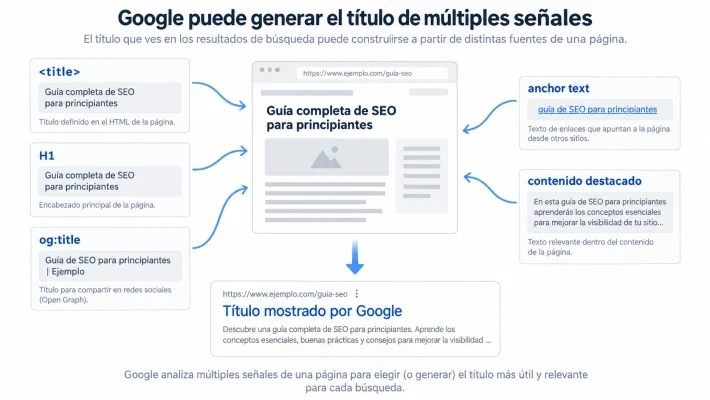
According to Google's documentation, to build a result's title it can use, among other things:
- the content of the <title> element;
- the main visible title of the page;
- headings such as the <h1>;
- the og:title;
- other large or visually prominent text;
- other text present on the page;
- anchor text;
- external links pointing to that URL;
- WebSite structured data.
This changes the diagnosis. If Google replaces your title again and again, going into WordPress, rewriting it almost the same and hoping it obeys out of politeness this time doesn't have much mileage. You have to look at all the signals around the URL.
The seven causes, from the silliest to the subtlest
1. The <title> Google actually receives
It seems obvious, but it goes first. Don't trust what Yoast, Rank Math or whatever SEO plugin you use says: look at the generated HTML. Themes, plugins, templates, JavaScript or dynamic configurations can make the final result not match what you think you configured. Before looking for sophisticated causes, make sure Google receives what you think it receives.
2. The main title of the page says something else
Google acknowledges that it uses the main visual title and headings as sources for title links. You don't need to turn the H1 into a religion, and having two H1s doesn't automatically cause a problem. What Google recommends is making clear which is the main title; it even warns that several large, visually equivalent headings can make it harder to identify.
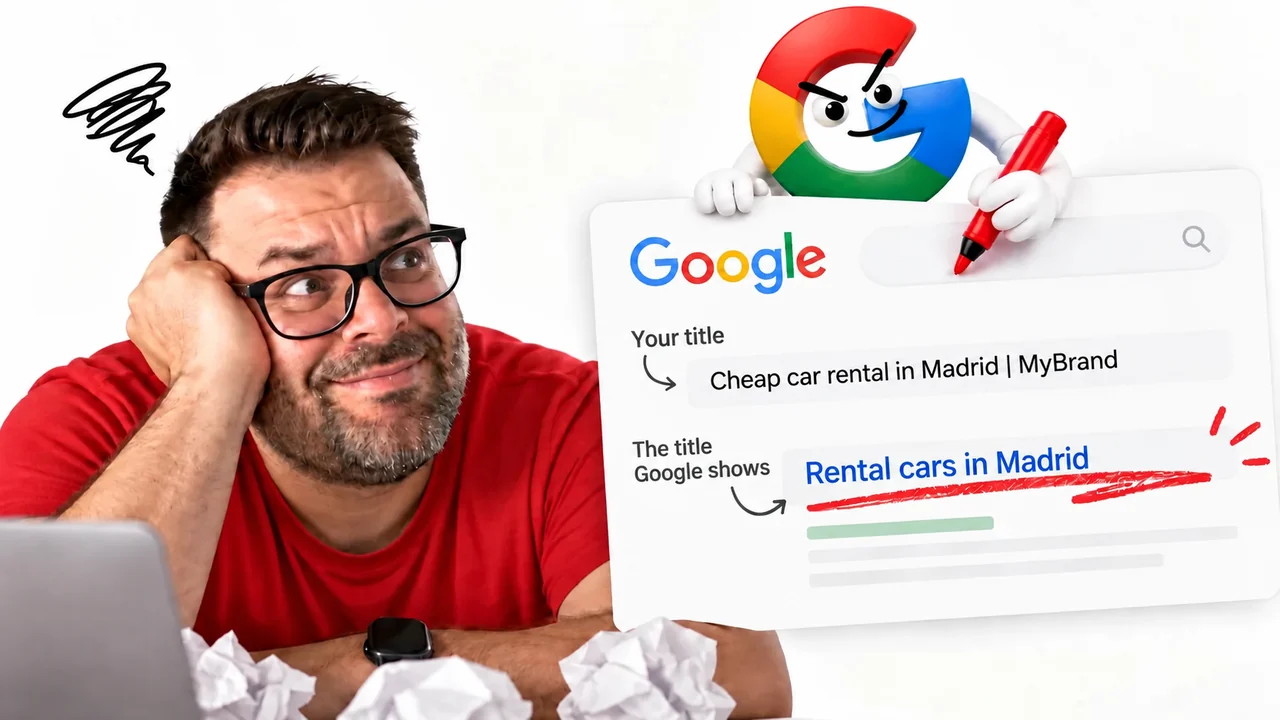
A typical case: the <title> says "Cheap car rental in Madrid | Brand" but the main heading says "Find your ideal car". Two different messages for the same URL, and Google can decide that other text on the page represents the content better.
3. The og:title tells a third version
We usually associate the og:title with how a URL looks when shared on social networks. However, Google includes it among the sources it can use for the title in Search. If <title>, H1 and og:title describe the page in three completely different ways, you send contradictory signals about which is the main title. They don't have to be identical, but they should be consistent.
4. Generic or repetitive titles
Google recommends a descriptive and concise <title>, and discourages titles that are repetitive, generic or loaded with text common to many URLs. Imagine an ecommerce site with 300 URLs whose title starts with "Buy online at the best price with fast shipping and great deals..." and only the last word changes. The useful part is buried inside a template, and Google may try to rebuild it with more specific information from the page.
5. The anchor text
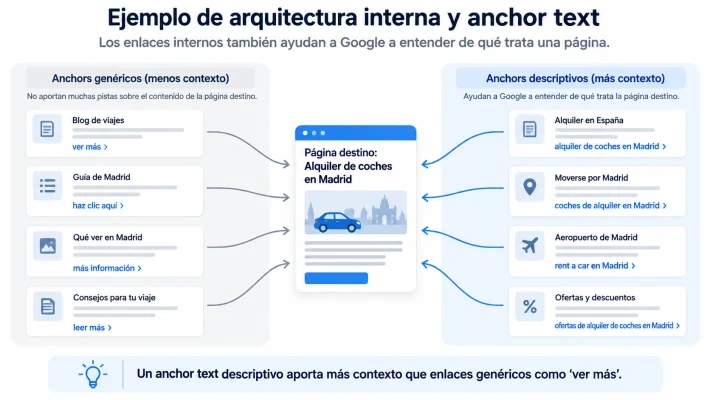
Probably the most interesting one. Google acknowledges that it can use both the text of the links present on the page and that of the links pointing to it. Internal linking thus becomes another source of context. If a URL is about "Car rental in Madrid" and you always link it as "see offers", "more information" or "click here", you waste a clear semantic signal.
It isn't that all links have to repeat an exact keyword; that would be swapping one problem for another, a rather shabbier one. What counts is that the link's context also helps describe the page. If you are interested in this part, there is more in internal linking: knowing where you link isn't enough.
6. Length, which matters less than people say
For years we have talked about titles of 55 or 60 characters as if, past 61, a Google official would appear with scissors. That technical limit doesn't exist: Google expressly states that there is no specific limit for the length of the <title> element. What happens is that the visible title can be truncated depending on the available space, mostly depending on the device.
That is why it makes sense to write concise titles, but not because there is a penalty for exceeding a certain number of characters. It is worth distinguishing between a practical recommendation and a Google rule that really doesn't exist.
7. Google hasn't crawled the page again yet
The least exciting explanation: Google may not have processed the change yet. Its documentation says it needs to recrawl and process the page to detect changes in these sources, and that this process can take anywhere from a few days to several weeks. Before redoing half the website because you changed a title yesterday, check when Google last crawled the URL. Sometimes the most sophisticated SEO diagnosis in the world is waiting. Humbling, but true.
How to apply it
- Open the URL's generated HTML (not the plugin) and confirm which <title> is served.
- Compare that title with the H1 and the og:title, and check they say the same thing, even if not with the same words.
- Review whether your titles differ between URLs or share a long template that buries what is specific.
- Look at the internal anchors (and, if you can, the external ones) pointing to the page: do they describe its topic or are they "click here"?
- Check the date of the last crawl before deciding the change hasn't worked.
- Change only what explains the discrepancy you have observed, not everything at once.
| Signal | What to check |
|---|---|
| <title> | That the generated HTML matches what is configured in the plugin |
| H1 and headings | That they make clear which is the main title and don't contradict it |
| og:title | That it is compatible with the title and the H1 |
| Titles across URLs | That they aren't generic or repetitive |
| Anchor text | That links provide context about the page |
| Last crawl | That Google has been able to see the change |
If you cannot see all the columns, scroll the table sideways.
And how do I stop Google from changing my titles?
You can't guarantee it, because Google generates title links automatically. What you can do is reduce the reasons for it to replace them: make all the important signals on the page clearly describe the same thing. That is, a specific <title>, a clear main heading, content consistent with that title, a compatible og:title, internal linking that provides context and differentiated titles across URLs.
Google will still have the last word. But at least we won't be describing our own page in five different ways and then wondering why Google chose a sixth.
If the title isn't the only thing Google changes for you, also look at why Google ranks the wrong URL.
Frequently asked questions
Why does Google show a different title from the one I wrote?
Because the title link is generated automatically and Google can use other sources besides the <title>: H1, og:title, other prominent text, anchor text, external links and WebSite structured data.
Is there a maximum length for the title?
There is no specific limit for the length of the <title> element. The visible title can be truncated depending on the available space and the device, so it is worth keeping it concise.
How long does Google take to show a new title?
Google needs to recrawl and process the page, and according to its documentation it can take anywhere from a few days to several weeks.
To finish your coffee
Titles are like almost everything in SEO: it isn't about giving Google orders, but about leaving it few doubts. If you want me to review with you why Google rewrites your titles, tell me your case. And if you want to fine-tune internal anchors, you have the internal links guide (in Spanish).
Sources and further reading
Google Search Central. Documentation on title links. - https://developers.google.com/search/docs/appearance/title-link