Robots.txt is not a padlock: blocking a URL doesn't take it out of Google
Translated from the Spanish original. Leer en español

Someone blocks a page in robots.txt because they don't want it to appear on Google. Weeks go by and the page still appears. Without a description, with a weird title, but it appears.
It isn't a Google bug. It is exactly what its documentation says, and almost nobody reads it before touching the file.
Robots.txt and sitemap.xml are always mentioned together and mixed up all the time. One talks about where a crawler can go in. The other, about which pages you would like it to look at. Neither of them decides what appears in the results. Let's take it step by step.
Robots.txt decides where the crawler goes in, not what appears on Google
A robots.txt file tells crawlers which URLs they can visit. According to Google's introduction to robots.txt, it is mainly used to avoid overloading your server with requests, and it isn't a mechanism to keep a page out of Google.

The reason is that crawling and indexing are two different things. The same Google page explains it: if you block a URL but other websites link to it with descriptive text, Google can index the address without having visited it. It appears in the results, but without a description, because it couldn't read anything from it.
To take a page out of the results, Google proposes other routes: the noindex tag, protecting the page with a password or deleting it. It details this in its guide to blocking indexing with noindex, where it adds two nuances that matter:
- Noindex can be set as a meta tag in the HTML or as an HTTP header (X-Robots-Tag). Google doesn't support writing noindex inside robots.txt itself.
- To see the tag, Google has to be able to crawl the page. If robots.txt closes the door on it, the noindex is invisible.
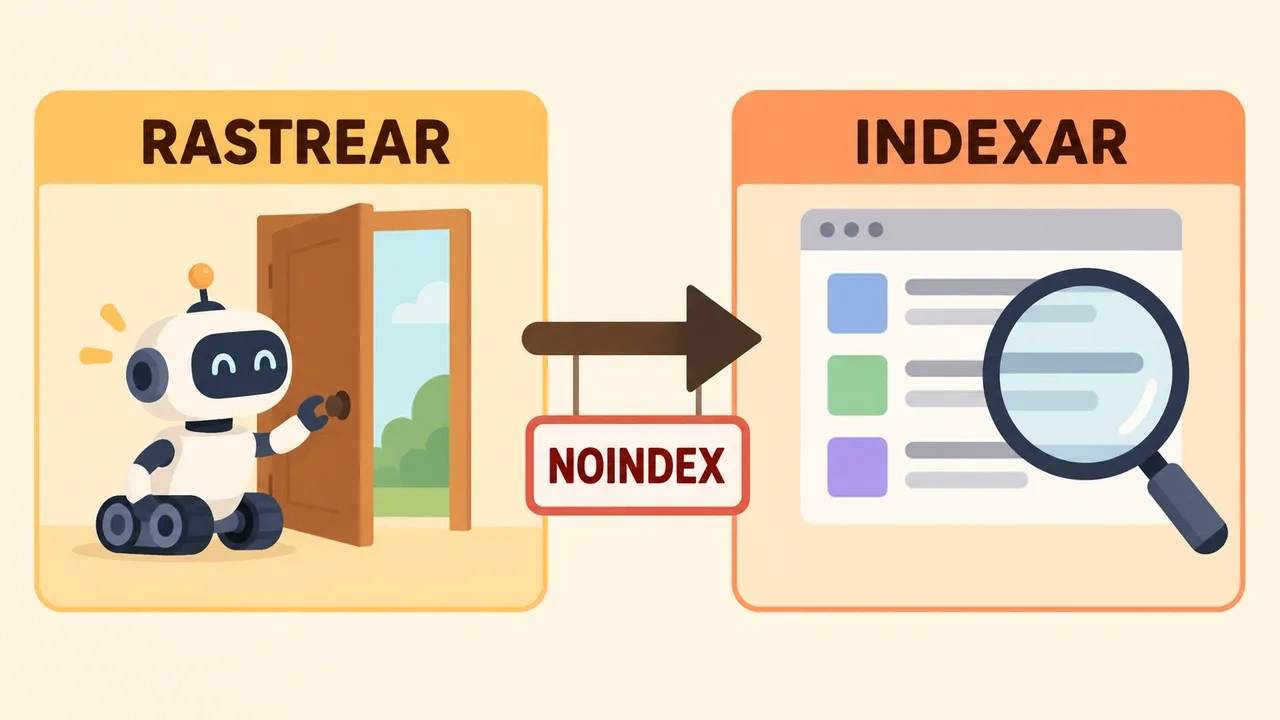
That is the most typical mistake: putting noindex on a page and also blocking it in robots.txt. The two instructions cancel each other out. The page you wanted to hide stays in view, and you think it doesn't work.
If you have already made the mistake, the fix is to remove the robots.txt block so Google can get back in and read the noindex. To check the state of a page, Google recommends the URL Inspection tool and the page indexing report in Search Console. It pays to be patient: the guide itself warns that recrawling can take months on pages that are rarely visited.
Operating rules that get forgotten
The Google page that explains how it interprets the robots.txt file has several details that save headaches:
- The file must be at the root of the site, and it is case-sensitive. A robots.txt inside a subfolder isn't valid.
- It only applies to the protocol, domain and port where it lives. A subdomain needs its own.
- If the server responds with a 4xx error (except 429), Google acts as if the file didn't exist, and crawls without restrictions.
- If it responds with a 5xx, Google stops crawling the site for the first 12 hours. After that it uses the last good copy for a maximum of 30 days.
- Google caches the file for up to 24 hours, so a change isn't applied instantly.
- It only reads the first 500 KiB. Anything beyond that is ignored.
- If there are several groups of rules, only one applies to each crawler: the one for the most specific user agent. The order of the groups doesn't matter.
A practical tip that comes from its guide to creating the file: edit it with a plain text editor, not with a word processor, because typographic quotes and other special characters can break the rules.
Sitemap.xml doesn't rule Google, it suggests
The sitemap is a file where you list the pages, videos and other files you consider important. Google reads it to crawl your site better and to receive data like the last modification date. That is how its introduction to sitemaps describes it.
That same page says something that contradicts a lot of habit: you may not need it. If your site has about 500 pages or fewer, is well linked from the home page and doesn't rely on video, images or news, the sitemap isn't essential. It does help on large sites, new ones with few external links, or with a lot of multimedia content.
When you decide to have one, Google asks for specific conditions in its guide to building a sitemap:
- File in UTF-8.
- Absolute, complete URLs, with protocol and domain. Relative paths don't work.
- A maximum of 50 MB uncompressed or 50,000 URLs per file. If you go over, you split into several and group them in a sitemap index.
- Better at the root of the site, because a sitemap that hangs from a folder only affects that folder.
There is a very widespread misunderstanding with Search Console. According to its sitemaps report, submitting a sitemap only tells Google where the file is. It isn't an upload, and it doesn't force Google to index anything. Also, the sitemap has to be accessible to Googlebot, and you can verify it with a live URL inspection. The opposite also misleads: deleting a sitemap from the report doesn't make Google forget the URLs it already knew. To make it stop crawling them you have to put a rule in robots.txt, delete the file or use noindex (in this case as a response header).
The sitemap has more to it: formats, lastmod, limits and errors are in the sitemap.xml article.
What breaks when the two contradict each other
If a URL is in the sitemap and blocked in robots.txt, you are telling Google "look at this page, it's important" and "don't go in" in the same minute. The sitemap should contain only the URLs you want crawled and indexed. Everything else is surplus.

With the pages you want out, the rule is the opposite: out of the sitemap, and the way to take them out of Google is noindex, not robots.txt.
An example from this same site: the cookie policy adds nothing in search results. It is marked with noindex and nofollow, doesn't appear in the sitemap and isn't blocked in robots.txt, precisely so Google can get in to read the noindex. Three pieces consistent with each other, instead of two that step on each other.
If you want to see why this matters beyond cookies, think of a website with thousands of URLs generated by filters or internal search. There the balance between what is crawled, what is indexed and what is offered in the sitemap stops being a detail. We already touched on it in transactional architecture, where every URL has to earn its place.
How to connect them: one line
Robots.txt supports a Sitemap line with the complete address of the file. You can put several. It is optional, doesn't depend on any particular crawler, and lets anyone who reads your robots.txt find your sitemap without you doing anything else.
User-agent: *
Disallow: /carrito/

Sitemap: https://tudominio.com/sitemap.xml
The address has to be complete, with https and domain. A relative path doesn't work.
Ten-minute checklist
- Open yourdomain.com/robots.txt. Does it exist and load? Is there a "Disallow: /" someone left over from a testing phase?
- Check that you aren't blocking scripts, styles or images the page needs to be understood. If they are missing, Google won't analyze well the pages that depend on them.
- Open your sitemap. It should only have URLs that exist, respond with 200 and that you want to index. No redirects, no noindex, no blocked pages.
- Confirm that robots.txt points to the sitemap with its full URL.
- In Search Console, submit the sitemap and look at the pages report: it will tell you which ones Google has discovered, which not and why.
- For any page you want out of Google: noindex, not Disallow. Also check with URL inspection that Google can get in to read it.
Frequently asked questions
Does robots.txt keep a page from appearing on Google?
No. Robots.txt controls crawling, not appearance in results: Google's own documentation says it isn't a mechanism to keep a page out of its search engine. To take a page out, use the noindex tag or protect it with a password. Deleting it also works, but removal isn't immediate: the URL can remain visible until Google crawls it again and confirms it is gone. Also, if robots.txt closes the door on Google, it never gets to read the noindex.
Where does the robots.txt file have to be?
At the root of the site, as yourdomain.com/robots.txt. It only applies to its protocol, domain and port, and it is case-sensitive. A robots.txt inside a subfolder is no use, and each subdomain needs its own.
How do I block one specific crawler without affecting the others?
With a group of rules for its User-agent. On Google, each crawler follows the most specific group for it, and if there are several groups applicable to that same crawler, Google combines them internally; the global group (the asterisk one) isn't mixed in. That is why that group has to repeat all the rules you want it to follow: it doesn't inherit those of the global group. Other search engines may interpret it differently.
I changed robots.txt and Google is still the same. Is that normal?
Yes. Google usually caches robots.txt for about 24 hours, although it can keep it longer when there are errors or depending on the server's cache-control headers. If the server returns 5xx errors, Google can pause crawling and keep using the last good copy while it retries the download; the exact behavior depends on how long the error lasts and the site's availability. The full sequence, step by step, is in Google's official documentation.
The idea to keep
Robots.txt controls access. Noindex controls appearance. The sitemap proposes. Mixing them is what makes a page you wanted to hide stay in view, or an important one take weeks to appear.
If you prefer not to touch robots.txt blindly, you can see what my technical SEO service includes.
Open your robots.txt today. If you have a Disallow with a page you want out of Google, you now know what needs to change.