Transactional SEO architecture: how to organize a website so Google understands where the business is
Translated from the Spanish original. Leer en español

Imagine a website with a home page, a menu with four options, a services section, a blog and a contact form.
At first glance it looks like a perfectly normal website.
The problem appears when you try to answer a simple question:
Which pages should rank for each business intent?
Many times nobody knows clearly.
Pages were created because the business offers certain services, because they looked good in the menu or because someone thought a new section was needed.
But transactional architecture shouldn't be built that way.
It should start from how people search. And today you also have to think about how Google searches on behalf of the customer: with AI Mode a single query can last days.
What is transactional architecture?
Transactional architecture is the organization of the pages that answer searches with the intent to hire, buy, book, compare or ask for commercial information.
It is not about creating many URLs.
It is about making sure that every business intent has a clear place within the website.
The starting point is keyword research
We tend to think of keyword research as a tool to decide which content to write.
But it also serves to decide how to build a website.
Imagine you analyze these searches:
- office cleaning
- office cleaning company
- office cleaning service
They are three different expressions, but they probably answer the same intent.
The user wants to find a company that cleans offices.
In that case, the logical thing is to work them within the same URL.
Now change the example:
- office cleaning
- industrial cleaning
- post-construction cleaning
Here we already have different needs.
The user searching for industrial cleaning is not looking for exactly the same thing as someone who needs to clean an office or a just-finished construction site.
Each group probably deserves its own page.
This is one of the most important ideas:
You don't create a URL for every keyword. You create URLs when there is a sufficiently differentiated intent.

From keywords to architecture
The process should be simple:
Keyword research → grouping by intent → defining URLs → hierarchy → internal linking
First you detect the demand.
Then you group the searches that essentially mean the same thing.
Next you decide which groups need a page of their own.
Finally you organize those pages so that users and search engines understand how they relate.
A simple example
Let's go back to our cleaning company.
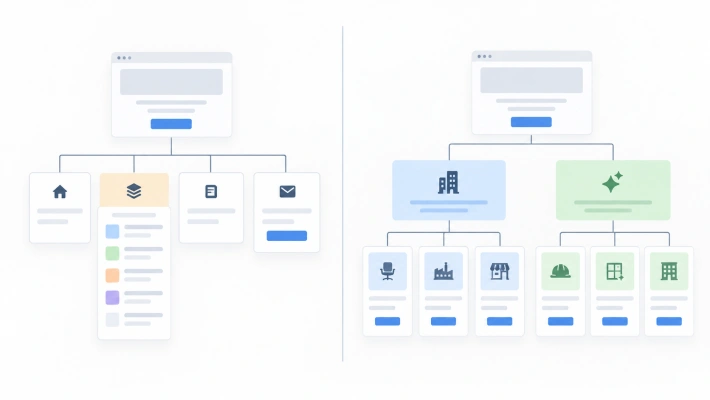
A poor architecture could be this:
Home → Services → Blog → Contact
Inside Services there is one huge page where office cleaning, industrial cleaning, residential communities, windows and post-construction appear.
All together.
The website may explain perfectly what the company does, but from a search point of view we are forcing a single URL to answer different intents.
A clearer architecture could be organized like this:
Cleaning for businesses
Home → Cleaning for businesses
- Office cleaning
- Industrial cleaning
- Shop cleaning
Specialized cleaning
Home → Specialized cleaning
- Post-construction
- Windows
- Facades
Now each page has a specific purpose and holds a logical position within the whole.
Your architecture is not your menu
Here a very common confusion appears.
Believing that a website's architecture is its main menu.
It is not.
The menu is just a navigation layer.
The architecture is the network of relationships between pages.
A URL can be linked directly from the home page without appearing in the header.
It can do so through a services block, a card, a featured module, a contextual link, a category block or any other internal element.
For example, the home page can have a section called Solutions for businesses.
From there it links to:
Cleaning for businesses
That page then links to:
- Office cleaning
- Industrial cleaning
None of those URLs necessarily needs to take space in the main menu to be part of a clear architecture.
Thinking of architecture as if it were only a dropdown menu limits enormously the way you design a website.
It is more useful to imagine it as a hierarchical network of paths.
Some routes are very visible. Others appear inside related pages.

What matters is that there is a logic.
Architecture also reflects priorities
An important page shouldn't stay isolated or depend on Google finding it by chance.
Nor is it a good idea for all pages to be linked from everywhere.
The architecture must reflect priorities.
The pages most important to the business should receive internal links from relevant areas of the website.
Child pages should be connected to their main categories or services.
Informational content should help reinforce transactional pages when there is a real relationship between both topics.
In other words, architecture doesn't just organize. It also establishes which pages are important and how they relate to each other.
The mistake of turning keyword research into a URL factory
Another frequent problem appears when we find many keywords and assume we need a page for each.
If we find fifty keywords, it doesn't mean we need fifty URLs.
Many will be variants of the same intent.
Creating a page for:
- office cleaning
- office cleaning company
- office cleaning service
doesn't build a better architecture.
It builds three pages trying to solve practically the same problem.
That increases the risk of cannibalization, duplicates work and makes it harder to decide which URL should rank.
So the right question is not:
How many keywords do we have?
The right question is:
How many different intents have we identified?
You can also get it wrong by grouping too much
There is the opposite problem.
A company may put all its services on a single page because administratively they belong to the same department.
But Google and the user don't know the company's org chart.
Nor do they have to.
The architecture should represent how demand is structured, not how the business is structured internally.
That nuance is important.
We are not organizing the website so that it reproduces the company.
We are organizing it to connect what the company offers with the way the user searches for it.
How to check whether your architecture makes sense
Before creating a URL, keeping it or merging it into another one, you can ask yourself these questions:
- Is there real demand for this page?
- Is the intent different enough from other pages?
- Do the search results show similar or different types of pages?
- Is another URL on our website trying to rank for the same thing?
- Is the page logically connected to its upper level?
- Can we reach it through clear internal links?
- Are we giving more internal visibility to the pages that really matter?

If it is hard to answer these questions, there is probably architecture work pending.
The idea to remember
Transactional architecture doesn't start by drawing a sitemap.
It starts by understanding how the user searches.
Keyword research tells you what demand exists.
Architecture decides where to put it.
One clear intent.
One clear URL.
One clear position within the website.
When that is well resolved, Google has to guess a lot less.
And any system that depends less on guesswork usually works better, even in SEO.